Oakville – A Municipality Theme for WordPress and Joomla
Welcome to Oakville – our new theme package for Joomla and WordPress. It's the perfect starter kit for your next municipality, town or government website – covering everything from public places, authorities, topics and announcements to services, downloads, public officials, news, and events. Oakville is all about displaying these content types in well-organized layouts, with easy-to-navigate categories and smart relationships. Of course, Oakville also comes with 34 content-rich page layouts, great-looking styles and many beautiful images. Time to put your town on the map. Let's go.
Make sure to subscribe to our YouTube channel and join our Discord Chat Server for all news and discussions.
Key Features
Oakville is built with the YOOtheme Pro page builder and uses all its features. With content types like public places, authorities, files, services and more – all connected through bidirectional relationships, Oakville demonstrates the full power of dynamic content. Upcoming local events are automatically filtered by date to highlight what's happening this month. For multilingual websites, a modern language switcher is built right into the header dropdown menu. The Menu element allows you to render sidebar menus for all categories with a single click. Privacy is handled by a fully integrated, GDPR-compliant cookie consent manager. And best of all, everything is accessible right out of the box.
Page Layouts
Oakville comes with 34 new layouts for all kinds of page types. One of the highlights is the heavy use of multi-column layouts with sticky sidebars for the navigation and related content so they're always within reach. Let's go through the layouts one by one.

Home

Place Index

Place Category

Place Subcategory

Place Post

Map

Authority Index

Authority Post

Announcement Index

Announcement Category

Announcement Post

Download Index

Download Category

Download Post

Service Index

Service Category

Service Post

Official Index

Official Category

Official Post

Topic Index

Topic Category

Topic Post

Topic Post List

Topic Post Table

Topic Post Tabs

News and Events

Post Index

Post

Event Index

Event Post

Search

Imprint

Error 404
| Page | Type | |
|---|---|---|
| Home | Page | The first thing you see on the Home page is a bold headline on top of a background video. There are glassmorphic cards linking to all the different content types, so they can be easily accessed right away. Next are latest announcements and news, followed by a table of upcoming events. Finally, there is a slider with all the authorities and links to popular services. The page ends with a large footer section with contact information, a newsletter signup and a detailed list of all pages. |
| Dropdown | Position | In the menu, the items evenly fill the available space in the navbar and open a full-width mega menu dropbar. Under Living in Oakville we load all categories from public places with their subcategories, under Government, you can find all authorities and links to their related services, announcements, public officials and downloads, under Our Community we load all topics grouped by their category, and finally, under News & Events you can find the latest news as well as a table of upcoming events. |
| Place Index | Template | Let's start with public places, or Living in Oakville. Like all main index pages, places start with a bold headline on top of a hero background video. Next is an image grid for all main categories with a video on hover for a more engaging experience, and their subcategories. |
| Place Category | Template | The category page has a 2-column layout. There is a sticky sidebar on the left with the navigation to easily browse through categories, and on the right – a list of all places grouped by their subcategory shown in an image slider. |
| Place Subcategory | Template | The subcategory is the same, but it shows all items in a list with their address and contact information. |
| Place Post | Template | All single post pages in Oakville have a 3-column layout with two sticky sidebars – the navigation on the left and additional content on the right, like address, location, opening hours, and more. For places, the main content can start with an image or a video. It is followed by an image gallery that opens in a lightbox, and a list of upcoming related events. |
| Map | Page | There is also an additional page that shows all public places and authorities on an interactive map covering the whole viewport. |
| Authority Index | Page | Next are authorities. Their index under Government shows all authorities in a list with links to their related downloads, public officials and services. There is also a sticky sidebar on the right with latest announcements, popular services and downloads. |
| Authority Post | Template | The authority page is just like places, but here the sidebar shows related officials, downloads and services, and in the main column you will also find an accordion with related topics and a list of related announcements grouped by their category. |
| Service Index | Template | Now to services. The index page under How do I? shows a typical A–Z index of all services with a letter-based filter for quick navigation. There is also a sticky sidebar on the left to browse between service categories. |
| Service Category | Template | The category page is the same, but there is an additional sidebar on the right showing the related authority with its contact information. |
| Service Post | Template | The service page shows its content and related download files in the main column, and the same related authority in the sidebar. |
| Announcement Index | Template | Next are announcements. Their index shows a grid of all categories with an image and a list of their latest announcements. |
| Announcement Category | Template | Just like services, the announcement category shows the related authority in the sidebar, and a list of all announcements in the main column. |
| Announcement Post | Template | Announcements show their content and related downloads in the main column. |
| Download Index | Template | The download index under Forms and Permits shows all categories in a grid with the image and subcategories side by side. |
| Download Category | Template | The category page shows all downloads with their download link grouped by their subcategory. The related authority is in the sidebar to the right. |
| Download Post | Template | And on the download page you won't miss the prominent download button. |
| Official Index | Template | Now to public officials. The index page is just like the one for downloads, but here we also show important persons right in the overview. |
| Official Category | Template | The category page has the related authority in the sidebar, and the main column shows all persons with their image, description and contact information. They are followed by a compact list of all persons grouped by their subcategories. |
| Official Post | Template | The public officials show their CV and a list of related assistants. |
| Topic Index | Template | Next are topics. The index page under Our Community shows a grid of all categories with videos on hover and a list of all their topics. |
| Topic Category | Template | The category shows all topics in a simple two-column grid. |
| Topic Post | Template | And topics also have a 3-column layout with their related authority and further information on the right. The topic content can start with an image, video, slideshow or map. Since topics often have lists of subtopics or additional information, we created different templates to display them. By default, the information is shown in an accordion with an image and description followed by a grid with related news. |
| Topic Post List | Template | There are also topics that show a list with a title, description and image side by side, for example for the town history. |
| Topic Post Table | Template | Alternatively, the topic can show a table with facts and numbers. |
| Topic Post Tabs | Template | Or show the information in a switcher with a tab navigation. |
| News & Events | Page | Just like in the mega menu, the News & Events page has a split view showing latest news and upcoming events grouped by month. |
| Post Index | Template | The post index shows all posts in a 2-column layout with the navigation on the left. |
| Post | Template | And posts again have a 3-column layout. The sidebar on the right can show a custom contact information, or a related authority or place. The post content is followed by latest news from the same category. |
| Events Index | Template | Finally, there are events. Their index shows a table with upcoming events grouped by month. |
| Event Post | Template | There are two types of events. Some events show a date range with opening hours, and others a list of specific dates. They are followed by the event information and organizer, which can be a related place or authority, a list of external links and downloads. The event content is followed by a table of other events from the same category. |
| Live Search | Template | Oakville also comes with a Live Search showing search results in a compact list with an image, title and link. What's special here is how the different content types are shown: news with their subtitle, events with their dates, and others with their category. And for more usability, you can even download files directly from the live search. Pretty nice, right? |
| Imprint | Page | Any governmental website needs an imprint page for all important legal information. In Oakville there is also a sticky navigation on the left and the town logo on the right. |
| Error 404 | Template | Finally, Oakville comes with a really unique Error 404 page. Here we have the logo, search, a link back to the home page as well as the whole footer section on the left and a large image of the town on the right. |
As always, all layouts can easily be loaded from the layout library with just a click. That's it for the layouts, now let's take a look at the style.
Style
Oakville has a subtle skeuomorphic style with a bold blue primary color and a darker secondary color. The navbar uses 1px borders that add a highlight on the left and shadow on the right, which in combination with backgrounds makes the items look like classic push buttons. Box shadows on hover add more depth to the default button and card, the pagination and accordion. Almost all UI components use borders and subtle gradients with darker blue tones to enhance contrast at the edges. The forms also get a primary border when focused. Slightly rounded corners, frosted-glass effect for overlay cards and modal and offcanvas backdrops soften the overall look and add some playfulness to the style. All this together with a dark, semi-bold sans-serif font will give your website a modern, professional look that's fully accessible.

In addition to the default style, Oakville comes with 5 other style variations, each with a different beautiful color scheme. There are two more white styles which are tone-on-tone, similar to the default style. One is green and another one is red, only that the red style uses black as the secondary color. The other three white styles have a bold primary color, which is also used for the active item in the navbar, and even for typography, making the styles much more colorful. They have pink and dark-violet, turquoise and dark-patrol, and red and teal colors. As always, you can switch the whole look and feel of your website with just a click. Simply choose what fits your website best!

White Green

White Red

White Pink

White Turquoise

White Bordeaux
Navbar Background and Border
Oakville uses the new background color option for navbar items. And honestly, we were surprised this wasn't possible in YOOtheme Pro until now. And to add some highlight edges, we used the new box shadow options.
Tabs
There's also a new border mode for tab items. You can display a simple bottom border or an animated line on hover, or outline the entire item with a border. Together with the new border radius option, you can create a classic tab navigation. We used it for the letter-based filter navigation on the services page. What's really great is that on smaller screens tabs use UIkit's new overflow fade effect, so if items extend beyond the container, they are subtly faded out and can be scrolled horizontally.
Accordion
Finally, Oakville makes use of the new title mode for the Accordion component. It shows the accordion titles in flat boxes that that smoothly transition into ones with a box shadow when active. This gives the accordions in YOOtheme Pro a completely new look.
That's it for the style. Next up are the Joomla and WordPress demo websites.
Joomla and WordPress Websites
Oakville comes with a fully functional Joomla and WordPress demo website. It has a well-thought-out content structure with custom fields for 9 different content types – public places, authorities, topics, announcements, services, officials, downloads, events and posts. Each content type has its own template for index, category and post pages loading their content dynamically into the layouts. Let's start with public places and authorities – the two main content types in Oakville.
Place
The Place content type has 20 custom fields. This includes fields for the video, contact image, opening hours, gallery, downloads and more.
| Place Field | Type (J) | Type (WP) | Description |
|---|---|---|---|
| Video | media | image | Place video |
| Contact Image | media | image | Place contact image |
| Images | subform | repeater | A list of images |
| Location | location | Google Map | Place location |
| Location Link | URL | URL | Link to Maps |
| Map Marker | list | select | Marker for Oakville map |
| Street | text | text | Place address |
| ZIP code | text | text | Place address |
| City | text | text | Place address |
| Country | text | text | Place address |
| text | text | Place email address | |
| Phone | text | text | Place phone number |
| Website | URL | URL | Place website |
| Opening Hours | subform | repeater | Opening hours |
| -Days | text | text | Opening days |
| -Hours | text | text | Opening hours |
| Opening Hours Note | text | text | Opening hours note |
| Note Title | text | text | General note title |
| Note Description | textarea | text area | General note description |
| Note Link | URL | URL | General note link |
| Contact Persons | subform | repeater | A list of contact persons |
| - Contact Person Name | text | text | Contact person name |
| - Image | media | image | Contact person image |
| - Job Description | text | text | Contact person position |
| - Contact Phone | text | text | Contact person phone number |
| - Contact Person E-Mail | text | text | Contact person email address |
| Files | subform | repeater | Downloads |
| - Title | text | text | Download title |
| - File | mediafile | file | Download file |
Place Categories
Places are grouped into 7 main categories, like Education and Family, Recreation and Tourism, and have further subcategories. There is one custom field for the main category to show a video.
| Category Field | Type (J) | Type (WP) | Description |
|---|---|---|---|
| Video | media | image | Category video |
Authority
The Authority content type is similar to public places and shares the same custom field group, including contact persons and downloads. Since there is only a limited number of authorities they are not grouped into categories.
| Authority Field | Type (J) | Type (WP) | Description |
|---|---|---|---|
| Video | media | image | Authority video |
| Contact Image | media | image | Authority contact image |
| Images | subform | repeater | A list of images |
| Location | location | Google Map | Authority location |
| Location Link | URL | URL | Link to Maps |
| Map Marker | list | select | Marker for Oakville map |
| Street | text | text | Authority address |
| ZIP code | text | text | Authority address |
| City | text | text | Authority address |
| Country | text | text | Authority address |
| text | text | Authority email address | |
| Phone | text | text | Authority phone number |
| Website | URL | URL | Authority website |
| Opening Hours | subform | repeater | Opening hours |
| -Days | text | text | Opening days |
| -Hours | text | text | Opening hours |
| Opening Hours Note | text | text | Opening hours note |
| Note Title | text | text | General note title |
| Note Description | textarea | text area | General note description |
| Note Link | URL | URL | General note link |
| Contact Persons | subform | repeater | A list of contact persons |
| - Contact Person Name | text | text | Contact person name |
| - Image | media | image | Contact person image |
| - Job Description | text | text | Contact person position |
| - Contact Phone | text | text | Contact person phone number |
| - Contact Person E-Mail | text | text | Contact person email address |
| Files | subform | repeater | Downloads |
| - Title | text | text | Download title |
| - File | mediafile | file | Download file |
Topic
The Topic type has 15 custom fields. This also includes fields for the video, external links, downloads, a list of subtopics and more.
| Topic Field | Type (J) | Type (WP) | Description |
|---|---|---|---|
| Location | location | Google Map | Topic location |
| Video | media | image | Topic video |
| Images | subform | repeater | A list of images |
| List Title | text | text | Subtopics |
| List | subform | repeater | A list of subtopics |
| - Title | text | text | Subtopic title |
| - Description | textarea | textarea | Subtopic description |
| - Image | media | image | Subtopic image |
| - Link | URL | URL | Subtopic link |
| Files | subform | repeater | Downloads |
| - Title | text | text | Download file title |
| - File | mediafile | file | Download file |
| Map Marker | media | select | Marker for post map |
| External Links | subform | repeater | External links |
| - Title | text | text | Link title |
| - Link | URL | URL | Link |
| Note Title | text | text | General note title |
| Note Image | media | image | General note image |
| Note Description | textarea | textarea | General note description |
| Note Link | URL | URL | General note link |
| Note Link Text | text | text | General note link Text |
| Conclusion | textarea | textarea | Conclusion |
| Authority | articles | relationship | Related authority |
Topic Categories
Topics are grouped into 8 categories, like Discover Oakville, Traffic, and Environment. There is one custom field to show a video.
| Category Field | Type (J) | Type (WP) | Description |
|---|---|---|---|
| Video | media | image | Category video |
Topic Tags
Topics use functional tags to assign different templates: List, Table and Tabs.
| Tag | Description |
|---|---|
| Template Topic List | Used for topics showing a timeline |
| Template Topic Table | Used for topics showing facts and numbers |
| Template Topic Tabs | Used for topics showing information with image and description |
Announcement
The Announcement content type has only 1 custom field for the download files.
| Announcement Field | Type (J) | Type (WP) | Description |
|---|---|---|---|
| Files | subform | repeater | Downloads |
| -Title | text | text | Download file title |
| -File | file | file | Download file |
Announcement Categories
Announcements are grouped into 4 categories, Press Releases, Construction Sites, Building Permits and Building Projects. Announcement categories have only 1 custom field for the related authority.
| Category Field | Type (J) | Type (WP) | Description |
|---|---|---|---|
| Authority | articles | relationship | Related authority |
Service
The Service content type has only 1 custom field to show related downloads.
| Service Field | Type (J) | Type (WP) | Description |
|---|---|---|---|
| Downloads | articles | relationship | A list of related downloads |
Service Categories
Services are grouped into 7 categories for each authority, like Town Hall, Registration Office, Building Authority and others. Service categories have only 1 custom field for the related authority.
| Category Field | Type (J) | Type (WP) | Description |
|---|---|---|---|
| Authority | articles | relationship | Related authority |
Service Tags
Services also use functional tags, like A-C, D-F and so on for the letter-based filter on the index and category pages.
Download
The Download content type has only 1 custom field to for its file.
| Download Field | Type (J) | Type (WP) | Description |
|---|---|---|---|
| File | mediafile | file | Download file |
Download Categories
Just like services, files are grouped into 7 categories for each authority, with the related authority as a custom field.
| Category Field | Type (J) | Type (WP) | Description |
|---|---|---|---|
| Authority | articles | relationship | Related authority |
Official
The Official content type has 7 custom fields to for the position, contact information and CV.
| Official Field | Type (J) | Type (WP) | Description |
|---|---|---|---|
| Position | text | text | Official position |
| Room Number | text | text | Room number |
| text | text | Email address | |
| Phone | text | text | Phone number |
| CV | subform | repeater | CV |
| - Year | text | text | CV year |
| - Description | textarea | textarea | CV description |
| Contact for Related Authority | articles | relationship | Contact for related authority |
| Officials | articles | relationship | A list of related officials |
Official Categories
Officials are also grouped into 7 categories for the authorities, but have further subcategories for their positions. There is also 1 custom field for the related authority.
| Category Field | Type (J) | Type (WP) | Description |
|---|---|---|---|
| Authority | articles | relationship | Related authority |
Post
The Post has 16 custom fields for the subtitle, contact information, external links, downloads and more.
| Post Field | Type (J) | Type (WP) | Description |
|---|---|---|---|
| Excerpt | textarea | text area | Post excerpt |
| Subtitle | text | text | Post subtitle |
| Contact Image | media | image | Contact image |
| Contact Name | text | text | Contact name |
| Location | location | Google Map | Location |
| Location Link | URL | URL | Link to Maps. |
| Street | text | text | Contact address |
| ZIP code | text | text | Contact address |
| City | text | text | Contact address |
| text | text | Contact email address | |
| Phone | text | text | Contact phone number |
| Website | URL | URL | Contact website |
| External Links | subform | repeater | External links |
| - Title | text | text | Link title |
| - Link | URL | URL | Link |
| Topics | articles | relationship | A list of related topics |
| Authority/Place | articles | relationship | Related authority or place |
| Files | subform | repeater | Downloads |
| - Title | text | text | Download title |
| - File | mediafile | file | Download file |
Post Categories
Posts are grouped into 4 categories, Culture, Sports, Politics and Community, which have no custom fields.
Event
Finally, the Event content type has 19 custom fields for dates, opening hours, location, downloads and more.
| Event Field | Type (J) | Type (WP) | Description |
|---|---|---|---|
| Excerpt | textarea | text area | Event excerpt |
| Teaser Image BG | media | image | Image to tease the event on the home page |
| Start Date | calendar | calender | Event start date |
| End Date | calendar | calender | Event end date |
| One-day-Event | checkboxes | checkbox | One-day event |
| Opening Hours | subform | repeater | Opening hours |
| - Days | text | text | Opening days |
| - Hours | text | text | Opening hours |
| Dates | subform | repeater | A list of event dates |
| - Date | calendar | calender | Event date |
| - Hours | select | select | Event hours |
| Date Note | text | text | Date note |
| Location | location | Google Map | Event location |
| Location Link | URL | URL | Link to Maps |
| Street | text | text | Event address |
| ZIP code | text | text | Event address |
| City | text | text | Event address |
| text | text | Event email address | |
| Phone | text | text | Event phone number |
| Website | URL | URL | Event website |
| External Links | subform | repeater | External links |
| - Title | text | text | Link title |
| - Link | URL | URL | Link |
| Files | subform | repeater | Downloads |
| - Title | text | text | Download title |
| - File | mediafile | file | Download file |
| Authority/Place | articles | relationship | Related authority or place |
Event Categories
Events are grouped into 6 categories, like Community, Culture and Sports, and also have no further custom fields.
Now let's see how everything is related to each other.
Relationships
In Oakville, posts have a related place or authority. It is shown in the sidebar on the post page as contact information for the news. In addition, posts can have a related topic. This allows them to be featured as recent news on the respective topic page.

Similar to posts, events have a related place or authority. It is shown in the sidebar on the event page as the event organizer. And on the place page, these events are showcased as upcoming events.

Topics have a related authority as well. It appears in the sidebar as the competent authority. On the authority page, these topics are also featured in an accordion with images.

Services also have a related authority. But here the relationship is set in the service category. This way the whole category is related to an authority, and you can shown it in the sidebar on both the category and single service pages. On the authority page, there is a list of popular services from that category. Additionally, each service can have related downloads. They are shown in a table at the bottom of the service page.

Downloads and announcements are similar. The related authority is set in the category and displayed in the sidebar on the category and single item pages. On the authority page, their latest downloads appear in the sidebar, while latest announcements are shown below grouped by their category.

Officials also have a related authority set in the category. And just like before, it is displayed on the category and single official pages. Additionally, an official can be the contact person for a related authority. This official is then shown in the sidebar on the corresponding authority page.

And this is what makes Oakville so powerful. Thanks to dynamic content and bidirectional relationships, changing a single item instantly updates everything across the entire site.
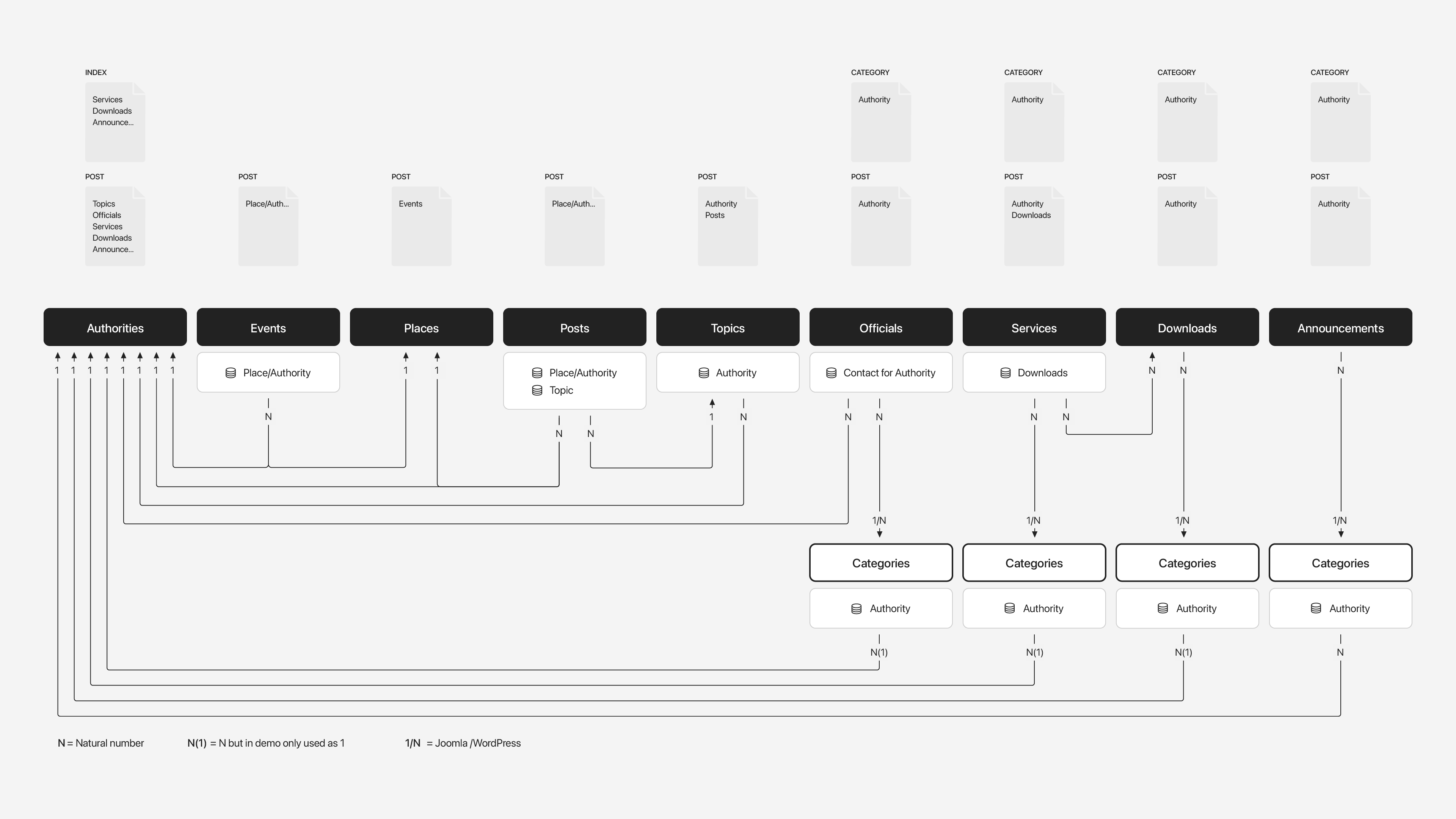
That's it for the Joomla and WordPress demo websites and their content structure. Next up are the image libraries.
Image Libraries
We created a set of handcrafted icons specifically for Oakville. On the home page they introduce the content types like public places, authorities, and services. And in the mega menu dropbar we used icons for main items such as place categories, archives, and topic categories. Each place category also has its own map marker used on the interactive map. Of course, you can find all icons in the Pro image library and use them with any style.

Finally, Oakville comes with more than 580 lovingly curated and free-to-use images. They can be found in the Oakville collection in the Unsplash and Pexels library.

And that's Oakville – our new theme package for Joomla and WordPress. It's the perfect starter kit for your next municipality website powered by the YOOtheme Pro page builder and all its features. Now go ahead and explore it yourself! As always, let us know what you think in the comments below.
- Municipality website
- 34 page builder layouts
- 6 beautiful styles
- 9 content types and 93 custom fields
- 49 handcrafted icons
- 580+ lovingly curated and free-to-use images
- Powered by the YOOtheme Pro page builder
- Available as WordPress theme and Joomla template